With KVM virtualization, dedicated resources and remote access via RDP, the server works like an always-on Windows computer, ensuring stability, low latency and uninterrupted execution of your trades.
Cloud VPS or personal computer: which is the right choice for MetaTrader?
This decision directly affects the stability of your trading, how your robots run and your financial results in the long term.
Many traders start out using their personal computer, believing it is enough to run MetaTrader and a few robots. However, as trading grows, problems that were invisible at first appear — power outages, unstable internet, system freezes and performance limitations.
In automated trading, any interruption, however small, can lead to unexecuted orders, high slippage or unexpected losses. That is exactly where a Windows Cloud VPS stops being a “luxury” and becomes an essential technical tool.
Personal computer
- Depends on local power supply
- Subject to internet outages
- Interruptions from system updates
- Higher latency to the broker
- Risk of freezes and overheating
- Needs to stay on 24/7
- Inconsistent robot execution
Risk: any failure can directly affect the results of automated trading.
Windows Cloud VPS
- Professional data center infrastructure
- High availability and redundancy
- Continuous operation 24 hours a day
- Lower latency to the broker
- Isolated and stable environment
- Remote access from anywhere
- Ideal for multiple robots (EAs)
Result: more stability, predictability and control over how your strategies run.
If you use automation robots, trade continuous strategies or simply cannot take unnecessary technical risks, the choice is clear: Windows Cloud VPS for MetaTrader.
Using MetaTrader on a Cloud VPS is simple
Even if you have never used a server before.
Many traders wonder how to use MetaTrader on a Windows Cloud VPS, imagining it is complex or very different from using a personal computer. In reality, the process is extremely simple.
After signing up, you access the server via Remote Desktop (RDP). Once connected, you will see a regular Windows desktop, as if it were a computer running just for you.
From there, everything works exactly as you are used to: open the browser, go to your broker’s website, download MetaTrader and install it normally, just as you would on your own PC.
Indicators, robots (EAs), templates and settings are installed the same way, with no adaptations, conversions or special procedures.
If you know how to install MetaTrader on your computer, you know how to install it on a Cloud VPS.
And if any questions come up along the way, you won’t be on your own. Our team is always available to help, whether with the first login, the remote connection or any step related to using the server.
At MINIVPS, our focus is making sure you can trade with peace of mind, stability and confidence, without unnecessary technical barriers.
Start using MetaTrader on a VPS in 3 steps
No hassle. No advanced settings. Just like your computer.
1. Access the server
Connect to the Cloud VPS using Remote Desktop (RDP). You will see a regular Windows desktop, as if it were a computer running just for you.
2. Download MetaTrader
Open the browser, go to your broker’s website and download MetaTrader, exactly as you already do on your PC.
3. Install and trade
Install MetaTrader, copy your robots (EAs), indicators and settings, and leave everything running 24 hours a day.
If you have a question at any step, our team is always available to help with access, installation or using the server.
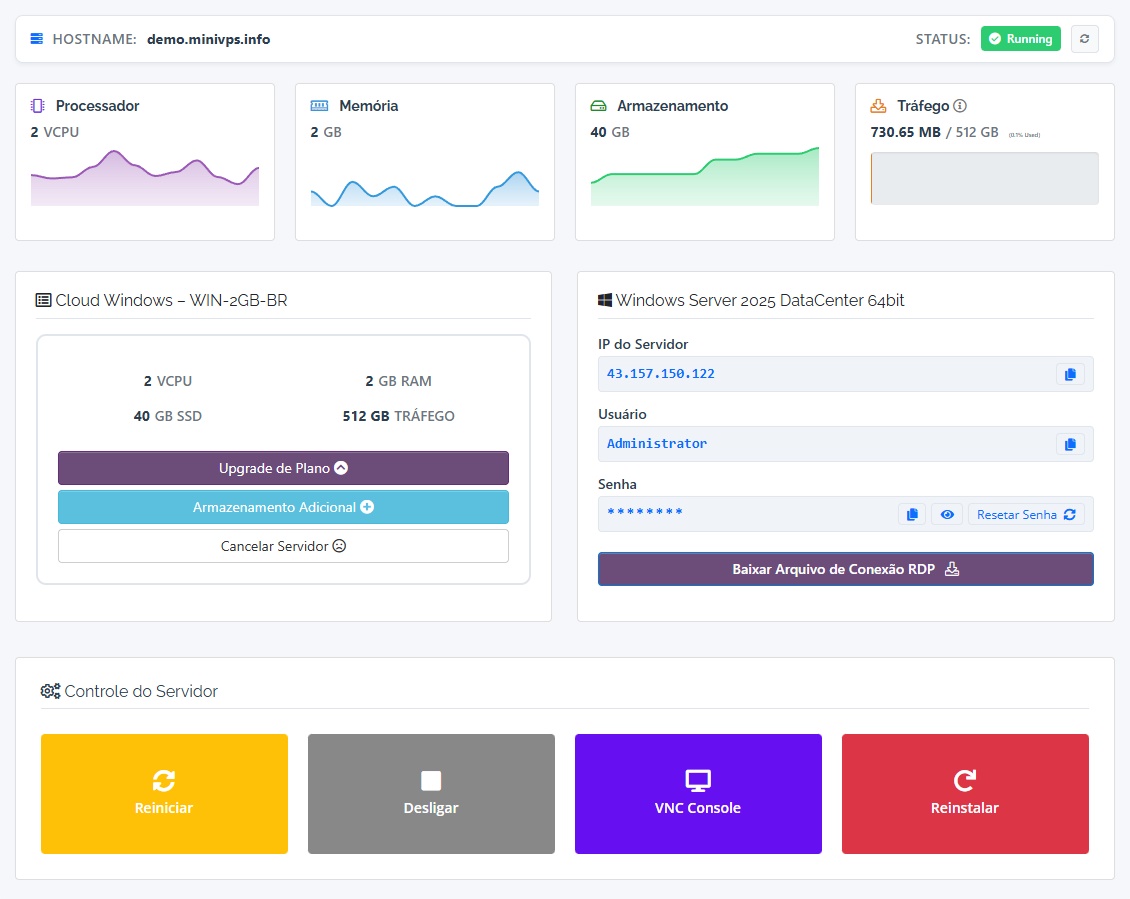
Complete management panel
All Windows Cloud VPS servers come with their own management panel, so you can manage your server with full autonomy, without depending on technical support.
- Full server control — Restart, shut down or power on the server instantly.
- Reinstall in a few clicks — Reinstall Windows whenever you need, with no red tape.
- Network management — Easily manage IP, hostname and access credentials.
- Real-time monitoring — Track server status, usage and availability.
Ideal for traders who need full autonomy, agility and reliability when managing their MetaTrader environment.
The MetaTrader ecosystem in practice
See how professional traders use MetaTrader for automation, advanced analysis and trading across multiple markets.
Automation robots (EAs)
Expert Advisors (EAs) are robots programmed to execute trades automatically based on predefined rules, removing emotional factors and allowing continuous execution.
Widely used for scalping, grid, arbitrage and statistical strategies.
Indicators and technical analysis
MetaTrader offers dozens of built-in technical indicators and supports custom indicators for trend, volatility, volume and chart pattern analysis.
Moving averages, RSI, MACD, Bollinger Bands and much more.
Plugins and extensions
Plugins expand MetaTrader’s capabilities, adding copy trading, advanced alerts, dashboards, risk managers and connections to external APIs.
Essential for more professional and customized setups.
Markets traded
Although best known in the Forex market, MetaTrader is also used to trade indices, commodities, stocks and cryptocurrencies.
It all depends on the broker and the assets it offers.
As trading becomes more complex — with multiple robots, charts, indicators and continuous execution — a Windows Cloud VPS stops being a luxury and becomes a technical necessity.
Strategic choice of server location
Unlike a personal computer, a Cloud VPS for MetaTrader should not be chosen based only on the user’s country, but on its proximity to the broker’s infrastructure.
The shorter the distance between your server and the broker’s servers, the lower the latency, reducing order execution delays, slippage and communication failures — critical factors especially for automation robots and short-term strategies.
That is why we offer servers in multiple strategic locations, so each trader can choose the region that best fits their setup, market and broker.
Below are the locations most used by traders, according to the brokers’ region and the lowest-latency routes.
Brazil · São Paulo
Recommended for traders who trade in Brazil or use brokers with infrastructure in Brazil.
- Low latency for RDP
- Integration with Brazilian brokers
- Easy local management
Germany
The best value option for MetaTrader, widely used by international traders.
- Excellent performance
- Low latency to Europe
- Ideal for multiple robots
United Kingdom · London
The top choice for traders using UK-based brokers.
- Strategic location
- Lower latency to UK brokers
- Institutional environment
United States
Ideal for traders who use brokers hosted in North America.
- Good international routes
- Stable infrastructure
- Suitable latency to global brokers
Why use a Cloud VPS for MetaTrader?
24/7 execution
Robots and strategies running continuously, without depending on your computer.
Low latency
Faster order execution with servers close to the brokers.
Stability
Isolated environment, dedicated resources and high availability.
Frequently asked questions about Cloud VPS for MetaTrader
What is a Cloud VPS for MetaTrader?
A Cloud VPS for MetaTrader is a Windows virtual server that runs 24 hours a day, allowing you to run MetaTrader 4 or MetaTrader 5, automation robots (EAs) and trading strategies without depending on your personal computer.
What is the advantage of using a VPS instead of a local computer?
A VPS offers continuous 24/7 operation, greater stability, lower risk of outages, faster order execution and independence from power, internet or your personal computer being turned off.
Does the Cloud VPS run 24 hours a day?
Yes. The Cloud VPS stays on continuously, so MetaTrader and your robots can run 24 hours a day, including weekends and holidays.
Can I run several robots (EAs) at the same time?
Yes. You can run multiple robots and MetaTrader instances simultaneously, as long as the chosen plan has enough CPU, RAM and storage.
What is the best VPS location for MetaTrader?
The best location is the one closest to your broker’s servers. Shorter distance means lower latency, better order execution and less slippage.
Is the VPS compatible with MetaTrader 4 and MetaTrader 5?
Yes. The Windows Cloud VPS is fully compatible with MetaTrader 4 (MT4) and MetaTrader 5 (MT5), so the platforms can be installed and used normally.
Can I access the VPS from a phone or tablet?
Yes. Access is via RDP and can be used from computers, phones and tablets that support remote desktop.
Does the VPS come with MetaTrader installed?
The VPS is normally delivered with a clean Windows installation, so you can install MetaTrader from the broker of your choice.
Can I reinstall Windows on the VPS?
Yes. The management panel lets you reinstall the operating system whenever needed, quickly and automatically.
Which plan should I choose for MetaTrader?
For a few robots, basic plans are enough. For multiple EAs, charts and complex strategies, we recommend plans with more RAM and dedicated CPU.